What is the Employee Scorecard?
Last updated: July 25, 2025
The Employee Score Card is the caregiver display on the admin Zingage dashboard view:
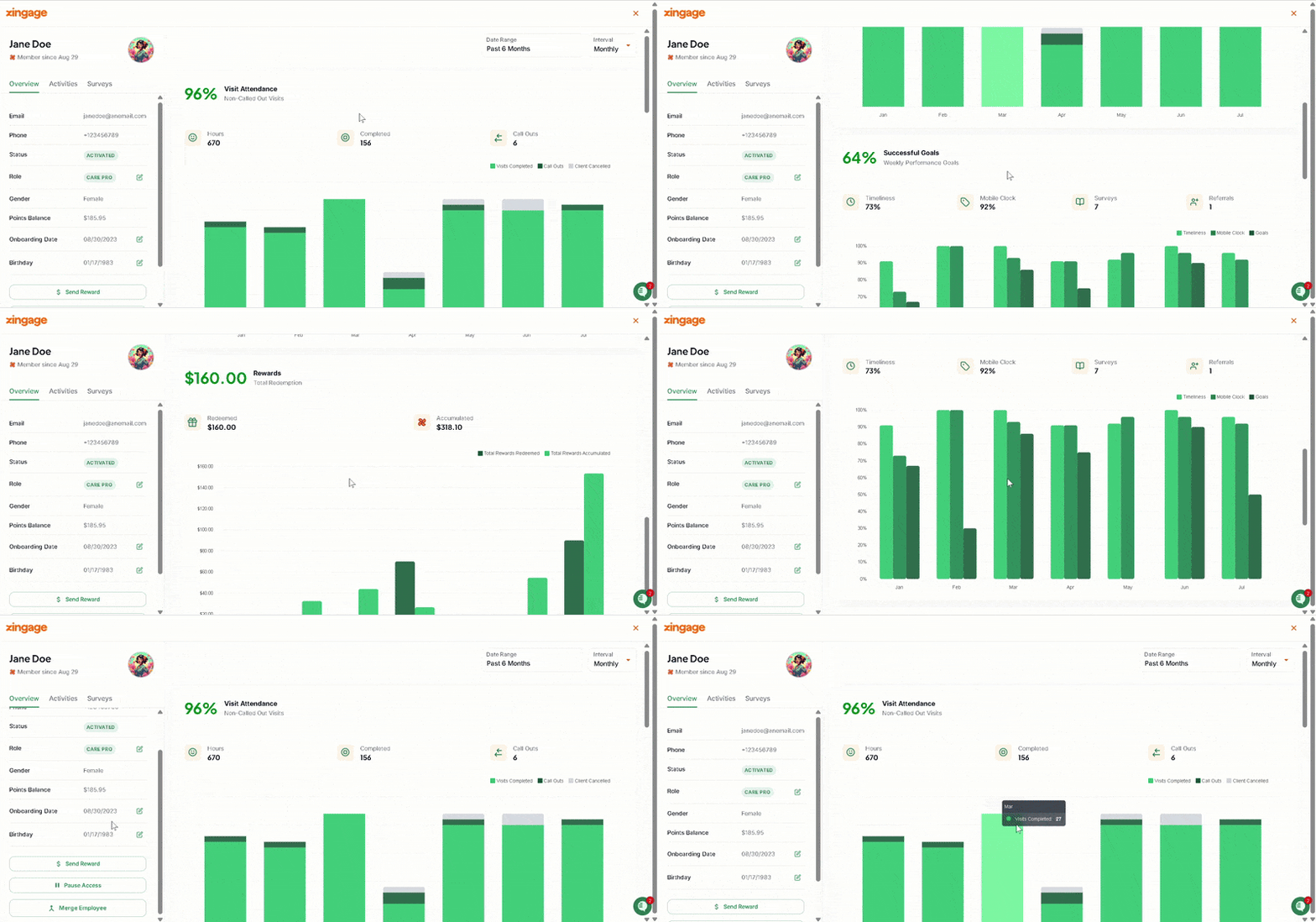
The Employee Score Card shows, in the selected date range, a synopsis of the caregiver's:
Visit Attendance: the bar graph shows the percentage of the user's visits that are successfully completed. It shows the hours worked, call outs, and completed visits within the selected date range.
Goal Performance: the bar graph shows the percentage of the users goals that are successfully completed on Zingage within the selected date range. The graph further breaks this down to show the percentage of Surveys, completed, Timelines Goals completed, Mobile Clock goals completed, and referrals made to the agency.
Rewards Redemption Trends: the bar graph shows the dollar equivalent points accumulated by the caregiver within the selected date range and the dollar amount spent on redeeming gift cards through Zingage.
To the left side, we have an:
Overview tab: of the caregiver's account listing their name, email, phone number, points balance, gender, and onboarding date to the agency. On that same tab, you can revoke their Zingage access by pausing their account, send them a spot reward or merge their account if they have a duplicate.
Activities tab: which displays the users accumulated points and lists their redemptions as well as any unclaimed spot rewards they may have.
Surveys tab: which displays the user's completed surveys and highlights of their responses on surveys