How Do I Submit a Support Ticket in Zingage?
Last updated: March 5, 2026
When you need assistance with Zingage, you may want to contact the Zingage Customer Support Team by submitting a support ticket.
To submit a support ticket in Zingage:
Log into your Zingage account
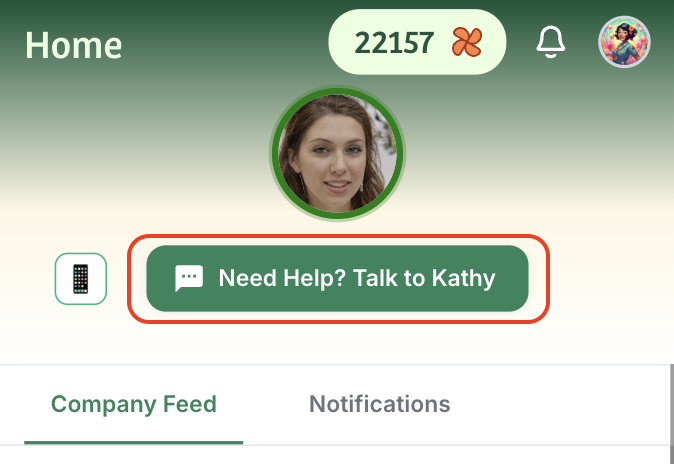
Click the 'Need Help? Talk to Kathy' button in the interface
Fill out the support form with your question or issue
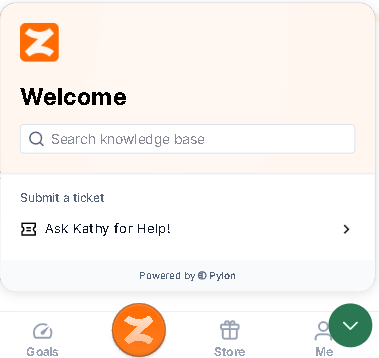
Try checking out the knowledge base to see if you can find the answer to your question there!
Once you submit your ticket, you’ll receive a confirmation with a ticket number. Our team will respond within 24 hours on weekdays.
Staff/Admins
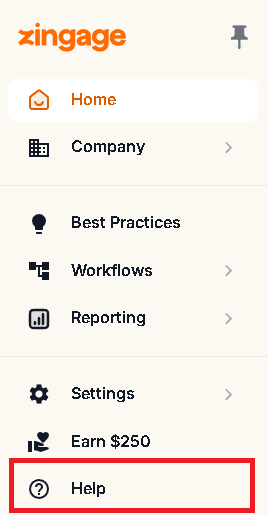
If you are a staff level user on Zingage, select 'Help' from the left navigation pane on your dashboard and select "Ask Kathy for help here" and fill out the form!
Try checking out the knowledge base to see if you can find the answer to your question there!
After submitting your ticket, you will receive a confirmation with a ticket number. The Zingage Customer Success Team will respond to your inquiry within 24 hours during weekdays.