Can I Remove Gift Cards from Zingage After Use?
Last updated: April 1, 2026
The My Wallet tab in Zingage is your personal hub for all the gift cards you've redeemed.
🔒 Permanent Record of Rewards
Gift cards in the My Wallet tab cannot be removed or deleted, as this section serves as a permanent record of all your redemptions. But you can mark your gift cards as used once they are used, so you don't get confused.
👀 Can I See Which Gift Cards Are Used or Unused?
For privacy and security reasons, Zingage does not track the usage status of your gift cards. However, you can mark your gift cards as used once they are used, so you don't get confused. To do that;
Go to Store
Click My Wallet
Next to the gift card, click the "Mark as Used" button next to the gift card
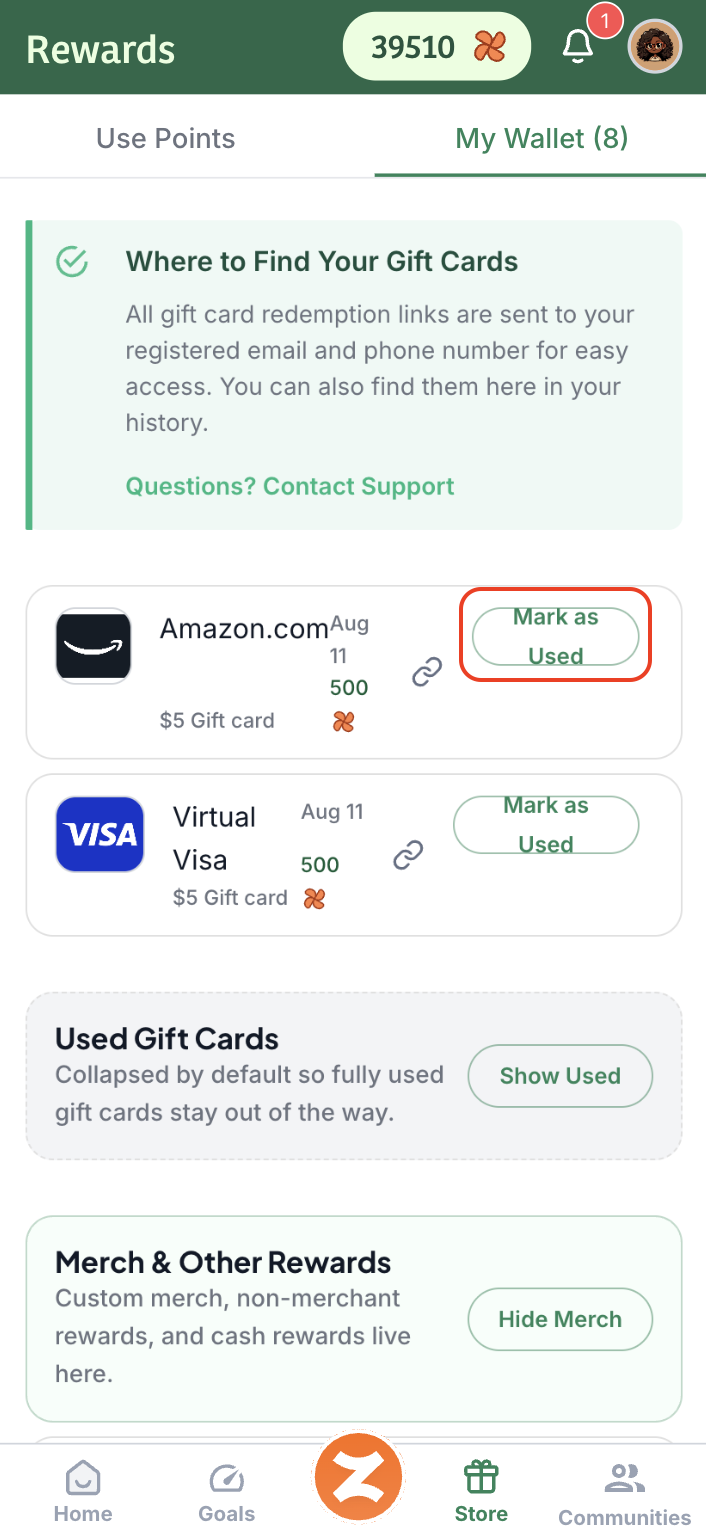
🎥This video shows you how, but you'd still need to access your gift card to know the gift card balance.
✅ How to Check a Gift Card Balance
You can always:
Use the original email you received when the gift card was issued
Click the gift card link on Zingage in the Store > My Wallet tab to view and monitor your balance directly with the merchant
This will help you know if the card has been used or still has funds available. For brand-specific balance checkers, check out our Gift Card Troubleshooting Tips article.
What to know how to use your gift card? Check out these articles: