How to complete surveys and earn points
Last updated: June 19, 2026
You can complete surveys to earn points through the Bonus Points/Bounties feature in the app.
Finding and completing surveys
To access and complete available surveys:
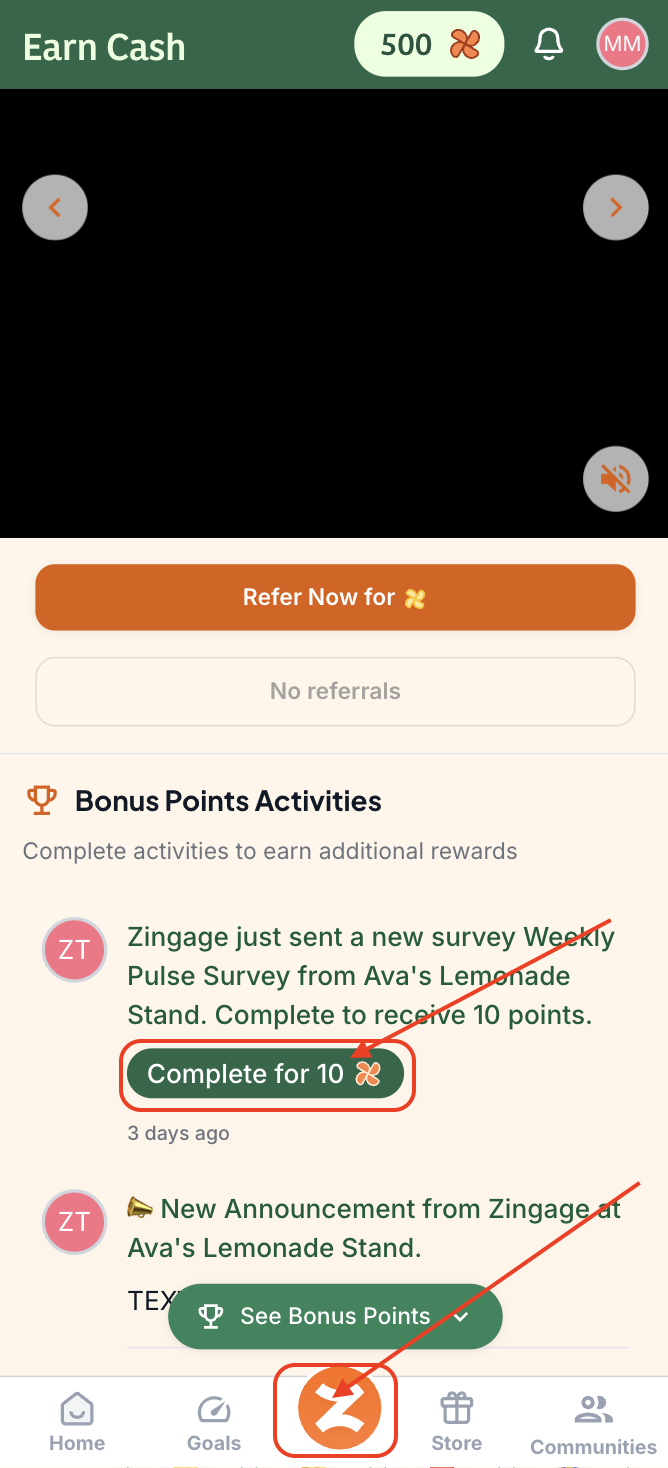
Tap the orange Z icon in the app (Depending on your agency, it might be your agency's logo at the bottom of the page between the Goals and Store tabs)
Scroll down the Bonus Points/Bounties area
Tap the green "Complete" button on any available survey
Earning points from surveys
Points are awarded automatically after you submit a survey, provided your agency has set up point rewards for that particular survey. The availability of points and the amount awarded is controlled by your agency.
Questions about reviews or specific requirements
If you have questions about leaving reviews or other specific survey requirements, contact your admin at your agency directly. They will have the most accurate information about your agency's specific policies and requirements.
For more detailed information, you can visit our help articles on how to navigate the app and earning points details.